This article contains affiliate links. If you sign up for HubSpot through our links, we may earn a commission at no additional cost to you.
HubSpot and Salesforce are two leading CRM platforms for scaling sales, but they suit different types of teams. HubSpot is generally better suited to growing businesses that want CRM software, sales automation, marketing, and customer support in a connected platform. Salesforce is particularly strong for larger organizations that need extensive customization and more complex sales processes.
The difference becomes more important as a sales team grows. A CRM that works for five representatives may become difficult to manage when the business adds new territories, pipelines, products, managers, and reporting requirements.
This HubSpot vs Salesforce comparison looks beyond feature lists to examine how each platform handles everyday sales work, automation, pipeline management, reporting, scalability, and cost.
Quick Answer: HubSpot vs Salesforce CRM
Choose HubSpot if your priority is getting sales teams working from a connected CRM without introducing unnecessary complexity. Sales Hub combines prospect management, deal pipelines, sales automation, forecasting, reporting, and AI-assisted selling with the broader HubSpot customer platform.
Choose Salesforce if your organization needs extensive customization, complex permissions, sophisticated sales processes, or an enterprise CRM that can be configured around highly specific operational requirements.
Neither platform is automatically better for every business. The important question is how much flexibility your sales process requires and how much time and technical support your organization can dedicate to managing the CRM.
HubSpot vs Salesforce at a Glance
| Category | HubSpot Sales Hub | Salesforce Sales Cloud |
|---|---|---|
| Best for | Growing teams wanting an integrated CRM and sales platform | Businesses needing extensive CRM customization |
| Free option | Free sales tools for up to 2 users | Free Suite |
| Starting paid price | Starter from $7/seat/month with annual billing | Starter Suite $25/user/month |
| Professional-level price | Professional from $90/seat/month with annual billing | Pro Suite $100/user/month |
| Enterprise price | Enterprise from $150/seat/month | Enterprise $175/user/month |
| CRM | HubSpot Smart CRM | Salesforce CRM |
| Pipeline management | Yes | Yes |
| Sales automation | Yes; capabilities vary by plan | Yes; capabilities vary by edition |
| AI sales capabilities | AI-powered sales tools | Salesforce AI and Agentforce capabilities |
| Marketing integration | Native connection with HubSpot Marketing Hub | Available through Salesforce products and integrations |
| Customer support integration | Native connection with HubSpot Service Hub | Available through Salesforce Service Cloud |
| Customization | Strong, with more advanced capabilities on higher tiers | Extensive |
| Ease of adoption | Generally suited to teams prioritizing straightforward implementation | Often better suited to organizations prepared for more configuration |
| Best fit as you scale | Teams wanting sales, marketing, and service on a connected customer platform | Organizations with complex processes, permissions, and customization requirements |
Pricing is in USD and reflects published starting prices as of August 2026. Pricing, billing terms, onboarding fees, add-ons, AI usage, and plan packaging can change, so businesses should confirm current costs before purchasing.
Pricing is in USD and reflects published starting prices as of August 2026. Pricing, billing terms, onboarding fees, add-ons, AI usage, and plan packaging can change, so businesses should confirm current costs before purchasing.
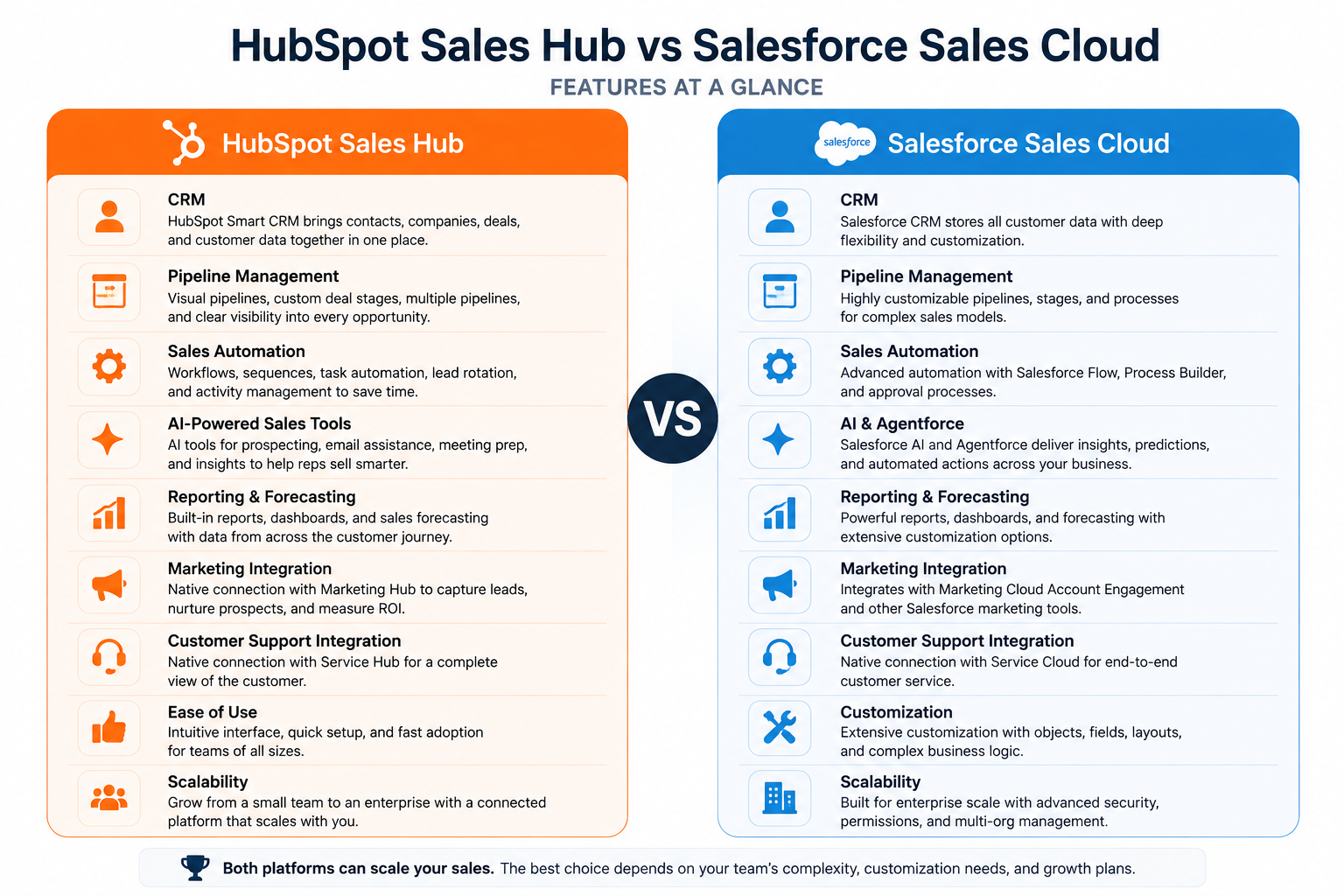
The table highlights the central difference between the platforms. HubSpot emphasizes connected workflows and accessibility, while Salesforce emphasizes customization and control. Both can support a growing sales organization, but the better fit depends on how complicated your sales operation becomes.
What Is HubSpot Sales Hub Best For?
HubSpot Sales Hub is best for teams that want to scale sales without separating CRM, prospecting, pipeline management, automation, and customer data across several systems.
Sales representatives can manage contacts, companies, deals, tasks, meetings, and sales activity while working from records stored in HubSpot Smart CRM. As requirements become more advanced, higher Sales Hub tiers add deeper automation, forecasting, reporting, prospecting, and sales management capabilities.
The practical benefit becomes clearer during an ordinary sales cycle. Imagine a prospect downloads a resource, returns to the website, speaks with a representative, books a meeting, and eventually requests a proposal. Instead of those activities living in different tools, the representative can use the CRM record to understand the relationship before deciding what should happen next.
That visibility becomes particularly valuable when lead volume increases. A well-structured CRM helps teams determine which opportunities need attention instead of relying on individual representatives to remember every follow-up.
The same principle applies to pipeline management. A growing team needs clearly defined deal stages, ownership, follow-up processes, and reporting rather than simply maintaining a list of opportunities. The Best Pipeline Management Tools of 2026 looks more closely at how structured pipelines help sales teams keep opportunities moving as lead volume increases.
HubSpot also reports that 84% of Sales Hub customers see increased revenue. While individual results naturally vary, the figure provides useful first-party evidence that businesses are seeing measurable outcomes from the platform.
What Is Salesforce Sales Cloud Best For?
Salesforce Sales Cloud is best suited to organizations that need a highly configurable CRM capable of supporting complex sales structures, processes, territories, permissions, and reporting requirements.
This flexibility is particularly valuable in large organizations. A company might have separate sales processes for enterprise accounts, smaller customers, renewals, channel partners, and different geographic regions. Salesforce can be configured around those requirements rather than requiring every team to follow an identical workflow.
Consider a multinational software company with sales representatives, account executives, regional managers, partner teams, and revenue operations staff. Different users may require different data, approval processes, forecasts, and permissions. This is where Salesforce’s depth becomes a meaningful advantage.
That flexibility also introduces an important consideration: a highly configurable CRM usually requires more planning and administration. Businesses should consider not only what a platform can do, but who will configure it, maintain data quality, manage workflows, train users, and adapt the system as processes change.
For smaller teams, that level of control may be unnecessary. For organizations with complicated sales operations, it can be precisely what makes Salesforce attractive.
How Do HubSpot and Salesforce Approach Scaling Differently?
Scaling sales isn’t simply about adding more representatives. A growing sales organization needs repeatable processes that help new and existing representatives qualify opportunities, follow up consistently, manage pipelines, and give managers reliable performance data.
HubSpot’s approach focuses on bringing those processes together. CRM records can connect with sales activity, marketing engagement, automation, and customer support, allowing different teams to work from shared customer information.
This is useful when sales and marketing operate closely together. A lead generated through a marketing campaign can enter the CRM, move through qualification and sales follow-up, and later become a customer whose service history remains connected to the broader customer record.
Teams building this type of process should focus on the workflow rather than automation for its own sake. How to Scale Sales Outreach with AI for Faster Growth examines how CRM data and automation can reduce repetitive work while keeping prospect communication relevant.
Salesforce approaches scale through flexibility and customization. Organizations can build specialized CRM environments around their processes, making it particularly useful when different divisions, territories, or sales teams operate in significantly different ways.
This creates a fundamental choice. HubSpot may appeal more to organizations that want to scale while keeping their technology stack relatively connected and approachable. Salesforce may be more appropriate when growth creates increasingly sophisticated processes that require extensive CRM customization.
When Does a Growing Sales Team Actually Need a More Advanced CRM?
A business doesn’t need an enterprise-level CRM simply because its sales team is growing. Complexity should be driven by the sales process, not company size alone.
A more advanced system becomes valuable when representatives manage multiple pipelines, leads require automatic routing, managers need reliable forecasting, customer histories become fragmented, or manual reporting starts consuming too much time.
The warning signs often appear gradually. Sales representatives start maintaining their own spreadsheets, managers struggle to determine why deals are stalled, marketing cannot see what happens to qualified leads, and customer information becomes scattered across different applications.
Moving to a more structured CRM can address those problems, but implementation matters as much as software selection. Top Starter CRMs for Growing Teams explains how usability, automation, integrations, and scalability affect CRM adoption when teams move beyond spreadsheets and basic sales tools.
The goal isn’t to buy the most powerful CRM available. It’s to choose a system sophisticated enough to support your sales process without creating more administrative work than it removes.
HubSpot vs Salesforce for Pipeline Management
Both platforms provide the core tools sales teams need to manage opportunities, but the experience differs as pipelines become more complex.
HubSpot Sales Hub gives representatives a visual deal pipeline where opportunities can move through defined sales stages. Teams can create multiple pipelines, customize deal stages, automate actions, assign tasks, and use pipeline data for forecasting and reporting, with capabilities varying by subscription level.
This approach works well for teams that want representatives to spend less time maintaining CRM records. For example, a sales manager can create a pipeline for new business, define the stages every opportunity should follow, and automate internal tasks when deals reach important milestones.
Salesforce Sales Cloud provides considerably more scope for organizations that need highly customized sales processes. Businesses can configure opportunity stages, record types, approval processes, fields, permissions, and automation around different products, territories, or sales models.
For a business with a relatively straightforward sales process, that additional flexibility may not be necessary. For a global sales organization running several distinct sales processes, however, Salesforce’s customization can become a significant advantage.
Verdict: HubSpot is generally easier to approach for straightforward and moderately complex pipelines. Salesforce becomes more compelling when pipeline management requires extensive customization across teams or business units.
HubSpot vs Salesforce for Sales Automation
Sales automation becomes increasingly valuable as lead volume grows. Tasks such as assigning leads, scheduling follow-ups, updating records, and moving opportunities between stages can consume significant selling time when handled manually.
HubSpot supports sales automation through workflows, sequences, task creation, lead management, and other tools available across its Sales Hub tiers. A representative might use a sequence to manage follow-up with a qualified prospect while workflows handle internal processes such as updating properties or creating tasks.
The goal should not be to automate every interaction. Automation works best when it removes repetitive administrative work while representatives continue handling conversations where judgment and personalization matter.
Salesforce provides powerful automation capabilities through tools such as Flow, allowing organizations to build processes around CRM data and business rules. This can support sophisticated workflows involving multiple teams, approvals, records, and decision points.
The difference again comes down to complexity. HubSpot can be attractive when teams want useful automation without building a heavily customized CRM environment, while Salesforce provides greater flexibility for organizations prepared to design and administer more sophisticated processes.
How Do HubSpot and Salesforce Use AI for Sales?
AI is becoming increasingly embedded in both platforms rather than existing as a separate sales tool.
HubSpot’s AI tools support different parts of the customer platform, while Sales Hub includes AI-assisted functionality designed to help representatives research prospects, prepare for conversations, work with CRM information, and reduce repetitive tasks. The exact tools and usage limits depend on the HubSpot subscription and available credits.
A practical use case is meeting preparation. Instead of manually reviewing a long contact history before a call, a representative can use AI-assisted tools to identify useful context and prepare more efficiently while keeping the CRM record at the center of the process.
Salesforce has similarly made AI a major part of its platform through Agentforce and other Salesforce AI capabilities. Its approach is particularly relevant to enterprises that want AI agents and automation to operate across highly customized Salesforce data and business processes.
Neither platform should be selected solely because it offers AI. The more useful question is whether its AI capabilities work effectively with the customer data, workflows, and sales processes your team already relies on.
Which CRM Is Better for Reporting and Sales Forecasting?
Reliable reporting becomes more important as a business grows because managers need to understand more than the total value of open deals. They need visibility into conversion rates, pipeline movement, representative performance, forecast accuracy, and where opportunities are being lost.
HubSpot combines CRM reporting with sales activity and pipeline data, while higher Sales Hub tiers provide more advanced reporting and forecasting capabilities. This can help managers connect sales performance with the marketing activities and customer interactions that contributed to an opportunity.
That broader context becomes useful when teams want to understand the full path from initial engagement to closed revenue. Instead of simply showing what happened to a deal, reporting can help reveal where the opportunity originated, how it progressed, and which activities influenced the outcome.
Salesforce is particularly strong when organizations require highly customized reporting across complicated sales structures. Its reporting, dashboards, and forecasting capabilities can support businesses with multiple territories, products, sales teams, hierarchies, and forecasting requirements.
For larger sales operations, this level of customization can be a significant advantage. For teams with less complex reporting requirements, the additional configuration may provide less practical value.
Verdict: HubSpot is a strong fit for teams that want sales reporting connected with broader customer data. Salesforce has the advantage when organizations need highly customized reports and forecasts across complex sales structures.
HubSpot vs Salesforce for Marketing and Customer Support
The CRM decision can affect more than the sales department. Growing companies often reach a point where marketing, sales, and customer support need access to the same customer information.
HubSpot was designed around this connected approach. Marketing Hub, Sales Hub, Service Hub, Content Hub, and HubSpot Smart CRM can work within the same broader customer platform, reducing the need to move customer information between separate systems.
For example, marketing can generate a lead, sales can manage the opportunity, and customer support can later view relevant customer history after the deal closes. This creates continuity across the customer lifecycle without requiring each department to maintain a separate customer record.
Salesforce can also connect sales, marketing, service, commerce, and other customer functions through its broader product ecosystem. The difference is that organizations often have more options for configuring how those products, data, and workflows operate together.
This distinction matters when businesses evaluate the hidden cost of using too many separate business tools. The subscription price of individual applications is only part of the equation; integrations, administration, training, and fragmented data can also add operational costs as a company grows.
Which CRM Is Easier to Implement and Use?
Ease of use is difficult to measure objectively because it depends heavily on the organization, existing systems, and complexity of the implementation.
HubSpot generally places greater emphasis on making CRM functionality accessible without extensive technical configuration. Smaller sales teams can begin with core CRM capabilities and add more advanced Sales Hub functionality as their requirements develop.
Salesforce provides greater scope for customization, but organizations implementing complex configurations may need experienced administrators, consultants, or implementation partners. That additional effort can be worthwhile when the resulting CRM closely matches sophisticated business processes.
The important consideration is total administrative burden, not simply how quickly someone can create an account. A CRM that is easy to start but cannot support future requirements creates problems later, while a highly configurable system can be unnecessarily complicated if a business never uses that flexibility.
Teams should therefore evaluate how much customization they genuinely need over the next several years rather than choosing based solely on the number of features available today.
HubSpot vs Salesforce Pricing: Which Offers Better Value?
Price is one of the most visible differences between CRM platforms, but comparing subscription fees alone can be misleading.
HubSpot provides free tools and paid Sales Hub tiers that allow businesses to add more advanced sales functionality as requirements grow. Salesforce also provides a Free Suite, followed by Starter, Pro, Enterprise, and higher-level offerings designed for increasingly sophisticated requirements.
As shown in the comparison table earlier, HubSpot Sales Hub Starter currently begins below Salesforce Starter Suite. The gap becomes less dramatic at higher tiers, making functionality, implementation, administration, and required add-ons increasingly important to the overall cost comparison.
A small sales team, for example, may place greater value on being able to start with a lower-cost platform and add functionality gradually. A larger organization may be willing to accept higher implementation and administration costs if Salesforce’s customization allows the CRM to match complicated operational requirements more closely.
Businesses should therefore calculate the total cost of ownership. Subscription fees, implementation, training, integrations, additional products, AI usage, administration, and future customization can all affect what a CRM actually costs over several years.
HubSpot vs Salesforce: Which Is Better for Scaling Sales?
HubSpot is generally the better fit for growing teams that want sales, marketing, and customer data connected without building a heavily customized CRM environment. Salesforce is generally better for larger organizations where extensive customization, complex processes, and enterprise-level control are central requirements.
That distinction matters more than simply comparing feature counts. Both platforms can manage contacts, pipelines, automation, forecasting, reporting, and AI-assisted sales processes.
A 20-person sales organization with relatively consistent pipelines may find HubSpot provides the structure it needs without adding unnecessary administration. A multinational company with several sales divisions, territory structures, approval processes, and specialized workflows may gain more from Salesforce’s flexibility.
The right choice therefore depends on what scaling means for your organization. If scaling means adding representatives and improving repeatable sales processes, HubSpot may be easier to grow with. If scaling means accommodating increasingly complex organizational structures and customized processes, Salesforce may justify the additional administration.
Frequently Asked Questions
Is HubSpot or Salesforce better for small businesses?
HubSpot is generally easier for small businesses to adopt when they want CRM, pipeline management, sales tools, and broader marketing capabilities without extensive configuration. Salesforce can still suit smaller organizations that know they will require its deeper customization.
Can HubSpot replace Salesforce?
For some businesses, yes. HubSpot can manage CRM records, sales pipelines, automation, forecasting, reporting, marketing, and customer support. However, organizations relying on highly customized Salesforce processes should evaluate their requirements carefully before migrating.
Is Salesforce more powerful than HubSpot?
Salesforce provides greater depth for extensive CRM customization and complex enterprise processes. That does not automatically make it better; businesses with simpler requirements may gain little from capabilities they do not need.
Is HubSpot easier to use than Salesforce?
HubSpot generally emphasizes faster adoption and less technical configuration. Salesforce can require more setup and administration, particularly when businesses take advantage of its extensive customization capabilities.
Which CRM is better for sales automation?
Both provide strong automation capabilities. HubSpot suits teams seeking sales automation closely connected with its CRM and customer platform, while Salesforce is particularly strong when businesses need highly customized automation across complex processes.
When should a growing business choose Salesforce instead of HubSpot?
Salesforce becomes particularly attractive when a business needs complex permissions, multiple specialized sales processes, extensive custom objects or workflows, sophisticated enterprise reporting, or substantial control over how the CRM operates.
Final Thoughts
HubSpot and Salesforce can both support a growing sales organization, but the better choice depends on how your sales operation is structured and how much complexity you expect to manage.
HubSpot is a strong fit for growing teams that want CRM, sales automation, marketing, and customer support connected in one platform. Salesforce is better suited to organizations that need extensive customization, complex workflows, and greater control over enterprise sales processes.
Rather than choosing based on feature count alone, consider how easily each CRM fits your pipelines, reporting requirements, integrations, and available administrative resources. McKinsey’s research on CRM and sales pipeline management highlights the value of clear pipeline processes and consistent CRM data for sales performance, forecasting, and financial planning.
The best platform is ultimately the one your team can use consistently as the business grows. For teams that prefer a connected approach with less initial complexity, HubSpot Sales Hub provides a practical starting point, with free CRM tools available before moving to more advanced sales features.