PRACTICAL SALES SOFTWARE GUIDE
Best Customer Journey Mapping Software Compared (2026)
HubSpot, Smaply, UXPressia, TheyDo, Miro, and Lucidchart can all help businesses understand the customer journey, but they solve different parts of the problem. Smaply and UXPressia specialize in visual journey […]
In this guide Show sections
- Quick Answer: What Is the Best Customer Journey Mapping Software?
- What Is Customer Journey Mapping Software?
- What Should You Look for in Customer Journey Mapping Software?
- Best Customer Journey Mapping Software Compared
- 1. HubSpot — Best for CRM-Connected Customer Journey Analysis
- 2. Smaply — Best for Dedicated Visual Customer Journey Mapping
- 3. UXPressia — Best for Journey Maps and Customer Personas
- 4. TheyDo — Best for Enterprise Journey Management
- 5. Miro — Best for Flexible and Collaborative Journey Mapping
- 6. Lucidchart — Best for Simple Customer Journey and Process Visualization
- Dedicated Journey Mapping Software vs CRM: Which Do You Need?
- How Can Customer Journey Mapping Improve Customer Experience?
- How Should You Choose Customer Journey Mapping Software?
- Frequently Asked Questions
- What is the best customer journey mapping software?
- Is HubSpot a customer journey mapping tool?
- What is the difference between customer journey mapping and customer journey management?
- Can Miro be used for customer journey mapping?
- Do small businesses need customer journey mapping software?
- Should customer journey maps be based on real customer data?
- Can CRM software replace customer journey mapping software?
- How much does customer journey mapping software cost?
- Final Thoughts
This article contains affiliate links. If you sign up for HubSpot through our links, we may earn a commission at no additional cost to you.
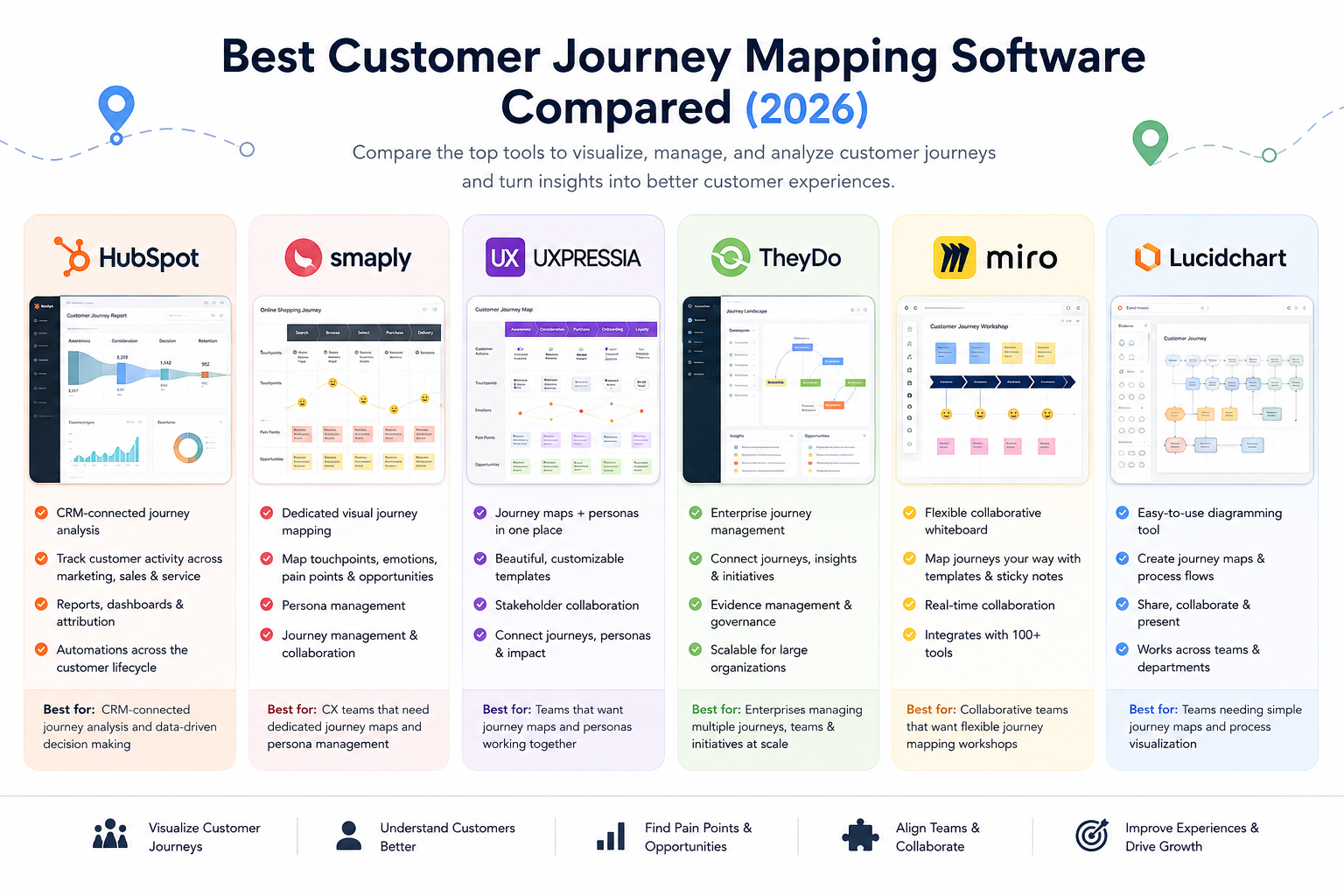
HubSpot, Smaply, UXPressia, TheyDo, Miro, and Lucidchart can all help businesses understand the customer journey, but they solve different parts of the problem. Smaply and UXPressia specialize in visual journey mapping, TheyDo focuses on managing journeys across larger organizations, and HubSpot is better suited to businesses that want journey analysis connected to real CRM, marketing, sales, and service data.
That distinction matters because a customer journey map should do more than create an attractive diagram. Its real value comes from understanding what customers experience at each stage, where friction occurs, which teams influence those experiences, and what the business can improve.
This guide compares the best customer journey mapping software in 2026 based on mapping capabilities, collaboration, customer data, analytics, integrations, pricing, and how effectively each platform can turn journey insights into action.

Quick Answer: What Is the Best Customer Journey Mapping Software?
Choose HubSpot if your priority is analyzing customer journeys using CRM, marketing, sales, and service data rather than primarily creating visual maps.
Choose Smaply if visual journey mapping is the main requirement and you want a dedicated platform for documenting touchpoints, personas, pain points, opportunities, and customer experiences.
UXPressia is particularly useful when journey maps and personas need to work together. TheyDo is designed for organizations moving beyond individual maps toward company-wide journey management. Miro and Lucidchart are more flexible choices for teams that mainly need collaborative diagrams and workshops.
The right choice therefore depends on whether you primarily need to visualize the journey, manage customer journey research, or connect the journey to actual customer activity.
What Is Customer Journey Mapping Software?
Customer journey mapping software helps businesses visualize and understand the stages customers move through when interacting with a company.
A typical journey might begin when someone discovers a business through search or social media. The same person may then visit the website, engage with marketing content, speak with sales, make a purchase, complete onboarding, contact customer support, and eventually renew or buy again.
Journey mapping brings these interactions together so teams can understand the experience from the customer’s perspective. A map might document customer goals, actions, expectations, emotions, pain points, channels, company touchpoints, and which internal teams are responsible at each stage.
The objective isn’t simply to document what the company thinks happens. A useful journey map should reveal where experiences break down and give teams enough information to decide what needs to improve.
For example, marketing may believe its job ends when a prospect submits a form. Sales may view the journey as beginning when the lead enters the CRM, while customer service may only see what happens after purchase.
From the customer’s perspective, however, these aren’t separate journeys.
Keeping information in one place makes those transitions easier to understand because marketing, sales, and service can work from the same customer history. This becomes especially useful as a business grows and information that was once manageable in spreadsheets, inboxes, and notes becomes harder to follow. A centralized approach to organizing customer information can provide a clearer picture of interactions across the wider customer journey.
What Should You Look for in Customer Journey Mapping Software?
The right features depend on what you expect the journey map to accomplish.
A UX or customer experience team may prioritize flexible visual maps, personas, emotions, touchpoints, and collaborative research. A marketing or customer success team may care more about connecting journey stages with customer behavior, lifecycle information, support interactions, and performance data.
For most teams, the important capabilities include visual journey mapping, collaboration, persona and touchpoint management, customer research, integrations, analytics, templates, and ways to record pain points and opportunities.
One particularly important distinction is static mapping versus journey management.
A static journey map might show that customers commonly move through awareness, consideration, purchase, onboarding, and retention. Journey management goes further by helping teams connect different journeys, identify recurring problems, prioritize opportunities, and monitor whether improvements are actually being made.
Customer data also matters. A map based entirely on assumptions can look convincing while failing to represent what customers actually do. Combining qualitative research with CRM, analytics, sales, and service information creates a much stronger foundation for understanding the journey.
Best Customer Journey Mapping Software Compared
| Platform | Best For | Starting Price | Visual Journey Mapping | Personas | Customer Data / Analytics | Journey Management |
|---|---|---|---|---|---|---|
| HubSpot | CRM-connected journey analysis | Free tools available; paid plans vary by Hub | Limited vs. dedicated mapping tools | Customer profiles rather than traditional mapping personas | ✅ Core strength | CRM, lifecycle, automation and reporting |
| Smaply | Dedicated visual journey mapping | Free plan; paid plans available | ✅ Core strength | ✅ | Integrations available | ✅ |
| UXPressia | Journey maps and personas | Free; Pro from $36/user/month | ✅ Core strength | ✅ Core strength | Integrations available | ✅ |
| TheyDo | Enterprise journey management | 30-day trial; paid plans by quote | ✅ | Journey frameworks | Integrations and evidence management | ✅ Core strength |
| Miro | Flexible collaborative journey mapping | Free; paid plans available | ✅ | Template-based | Through integrations | Manual/flexible |
| Lucidchart | Simple journey and process visualization | Free; paid plans available | ✅ | Template-based | Limited vs. specialist platforms | Manual/flexible |
Pricing and packaging can change. Businesses should confirm current pricing, billing cycles, user limits, and feature availability directly with each provider before purchasing.
The table highlights an important point: these aren’t six versions of the same software.
Smaply and UXPressia are dedicated journey-mapping platforms, while TheyDo takes the concept further into enterprise journey management. Miro and Lucidchart provide flexible visual environments that can be adapted for journey mapping.
HubSpot takes a different approach. Its strength isn’t producing the most sophisticated visual journey map. Instead, it helps businesses connect different stages of the journey with customer and operational data generated as people interact with marketing, sales, and service teams.
1. HubSpot — Best for CRM-Connected Customer Journey Analysis
HubSpot is best suited to businesses that want customer journey insights connected to real customer records, marketing activity, sales interactions, and service data.
This distinction matters because journey maps are often created during workshops and then gradually become outdated. A map may show how an organization believes customers behave, while its CRM contains evidence of what customers actually did.
Imagine a B2B software company trying to understand the complete path from discovery to long-term customer.
A prospect discovers an article through search, visits several product pages, downloads a guide, receives marketing emails, books a demonstration, enters the sales pipeline, becomes a customer, completes onboarding, and later contacts support.
When those interactions are connected through HubSpot, marketing, sales, and service teams can examine the relationship as one continuous journey rather than viewing their individual stages in isolation.
The underlying data can then help answer practical questions. Where are leads dropping out? Which campaigns produce customers rather than just traffic? How long do opportunities remain at different stages? Are particular support issues repeatedly appearing after onboarding?
HubSpot also provides customer journey reporting on eligible Enterprise subscriptions. According to HubSpot’s customer journey reporting documentation, these reports can help teams examine how contacts, deals, or tickets move through defined stages and identify which interactions contribute to progression through the journey.
This is where HubSpot differs from dedicated visual mapping software. A customer experience team that needs detailed diagrams showing emotions, personas, pain points, and visual touchpoints will find more specialized mapping capabilities in platforms such as Smaply or UXPressia.
HubSpot becomes more valuable when the priority is connecting the journey to customer behavior and measurable business outcomes.
Once customer activity is centralized, reporting becomes an important part of understanding what happens at different stages. HubSpot CRM dashboards and reporting tools can bring sales, marketing, service, and revenue information together so teams can examine performance without treating every stage as a separate dataset.
Best for: Businesses that want to connect customer journey analysis with CRM, marketing automation, sales activity, customer service, and reporting.
Drawback: HubSpot is not a dedicated visual journey-mapping platform, and its dedicated customer journey reporting requires eligible Enterprise subscriptions. Teams primarily interested in detailed visual maps and personas may get more value from Smaply or UXPressia.
2. Smaply — Best for Dedicated Visual Customer Journey Mapping
Smaply is designed specifically around customer journey mapping and journey management, making it a stronger option when the map itself is central to the customer experience process.
Teams can document journey stages, customer actions, emotions, pain points, opportunities, and other information in a structured visual format. Personas can also be connected to the wider journey-mapping process.
Imagine a hotel group investigating the experience of first-time guests. The journey could begin with researching accommodation, then move through booking, pre-arrival communication, check-in, the stay itself, checkout, and post-stay follow-up.
At each stage, the team can document expectations, channels, emotions, problems, and opportunities for improvement. Marketing, operations, customer service, and management then have a shared view of the experience rather than each department seeing only its own interactions.
Smaply also goes beyond individual diagrams with capabilities designed to organize journeys and customer experience work over time. This makes it more suitable for organizations that want journey mapping to become an ongoing process rather than a one-time workshop.
Best for: Customer experience and service-design teams that want purpose-built journey maps, personas, collaboration, and journey management.
Drawback: Businesses primarily interested in CRM activity, pipeline behavior, marketing attribution, or service performance will still need operational customer data from other systems.
3. UXPressia — Best for Journey Maps and Customer Personas
UXPressia combines customer journey mapping with persona creation, making it particularly useful when teams want to connect the journey with a clearer understanding of who the customer is and what they are trying to accomplish.
Consider a financial services company serving both first-time and experienced investors. The two groups might use the same website and products, but their questions, concerns, knowledge, and expectations can be very different.
Instead of creating one generic customer journey, the company can develop separate personas and examine how each group experiences research, account creation, onboarding, product use, and ongoing communication.
This helps prevent journey mapping from becoming too broad. A pain point that creates significant uncertainty for a first-time investor may barely affect an experienced customer.
UXPressia is therefore particularly useful when persona development and journey mapping need to work together. Teams can create visual journeys while keeping customer motivations, goals, frustrations, and expectations central to the process.
Best for: Teams that want detailed customer journey maps and personas within the same dedicated customer experience workspace.
Drawback: The quality of the maps still depends on the quality of the underlying research. Personas and journeys built mainly from internal assumptions can be visually impressive without accurately representing real customers.
4. TheyDo — Best for Enterprise Journey Management
TheyDo is better suited to organizations that have moved beyond creating individual customer journey maps and need a structured way to manage many interconnected journeys across teams, products, and customer segments.
This becomes important as journey mapping spreads across an organization. Marketing may maintain one set of maps, customer experience another, while product and service teams create their own. Before long, the company can have dozens of maps documenting similar touchpoints and customer problems in different ways.
TheyDo is designed to bring that work into a more consistent journey-management framework.
Imagine a financial services company offering banking, lending, insurance, and investment products. Customers may move through different onboarding, account-management, support, renewal, and cross-selling journeys, but many of those experiences share the same underlying touchpoints and problems.
Instead of treating every map as an independent project, teams can connect journeys with research, insights, opportunities, and improvement initiatives. If several journeys reveal similar problems during identity verification, for example, the organization has stronger evidence that this is a broader customer experience issue rather than a problem affecting only one product.
This is where TheyDo differs from simpler mapping tools. The question shifts from “How do we create a journey map?” to “How do we manage everything we’ve learned about our customer journeys?”
Best for: Larger organizations managing multiple journeys, products, customer segments, and customer experience initiatives.
Drawback: Smaller teams creating only a handful of journey maps may find a dedicated mapping tool or collaborative workspace simpler and more cost-effective.
5. Miro — Best for Flexible and Collaborative Journey Mapping
Miro isn’t dedicated customer journey mapping software, but its flexible visual workspace makes it a practical choice for teams that want to build journey maps collaboratively without adopting another specialized platform.
The open canvas gives teams considerable freedom over how a journey is structured. Marketing, UX, product, sales, and customer service teams can work together using diagrams, notes, research, templates, and other visual elements.
For example, a business redesigning its customer onboarding process could run a workshop where different departments map the experience from purchase through implementation.
Sales might identify expectations being created before a deal closes. The onboarding team could document recurring setup problems, while customer support could highlight questions customers repeatedly ask during their first month.
The result isn’t simply a finished journey diagram. The mapping process itself helps teams see where their responsibilities overlap and where customers may experience gaps between departments.
That flexibility is also Miro’s main limitation for this use case. Dedicated journey-mapping platforms provide more structure for managing personas, journey hierarchies, research evidence, and ongoing customer experience initiatives. With Miro, teams generally need to create and maintain more of that structure themselves.
Best for: Teams that want flexible, collaborative customer journey workshops and already use a visual workspace for planning or research.
Drawback: Journey management and customer experience research are less structured than in purpose-built platforms such as Smaply, UXPressia, or TheyDo.
6. Lucidchart — Best for Simple Customer Journey and Process Visualization
Lucidchart is another general-purpose visual platform that can be adapted for customer journey mapping.
Its main advantage is straightforward diagramming. Teams can create customer journey maps alongside process flows, service blueprints, organizational diagrams, and other visual documentation without introducing a specialized customer experience platform.
Consider a small ecommerce company trying to understand what happens between a customer’s first website visit and receiving an order. The team could map product discovery, checkout, payment, order confirmation, fulfillment, delivery, and post-purchase communication, then identify stages where customers commonly experience delays or confusion.
For that type of exercise, an enterprise journey-management system may be unnecessary. A straightforward visual representation can be enough to help the team identify obvious gaps and decide what should change.
Lucidchart becomes less suitable when an organization wants journey maps to function as an ongoing customer experience repository containing extensive research, personas, opportunities, and interconnected journeys.
Best for: Teams that need straightforward journey diagrams and want a general-purpose visualization tool that can also support other business processes.
Drawback: It lacks the deeper customer experience and journey-management structure found in dedicated platforms.
 s
s
Dedicated Journey Mapping Software vs CRM: Which Do You Need?
Customer journey mapping software and CRM software solve related but different problems.
Dedicated mapping platforms such as Smaply and UXPressia help teams model the experience. They are useful for documenting what customers are trying to accomplish, how they feel, which touchpoints they encounter, and where pain points occur.
CRM software records what happens during actual customer relationships. It can contain website activity, marketing interactions, sales conversations, lifecycle stages, purchases, support requests, and other operational information.
Neither approach automatically replaces the other.
For example, a journey map might suggest that customers frequently become frustrated during onboarding. CRM and service data can then help determine whether the hypothesis is supported by longer onboarding times, repeated support requests, low engagement, or customer churn.
This combination can be more useful than relying entirely on either visual mapping or quantitative data.
The map provides context; customer data provides evidence.
How Can Customer Journey Mapping Improve Customer Experience?
Journey mapping becomes useful when it reveals something the organization can actually change.
One common problem is the handoff between departments. Marketing might promise a particular experience, sales may create additional expectations, and customer success or support may receive the customer without enough context about what happened earlier.
Mapping the complete journey makes these transitions easier to see.
A business might also discover that customers repeatedly contact support because an earlier onboarding step is unclear. Improving that stage could reduce support demand and create a better customer experience instead of simply trying to answer the resulting tickets faster.
Journey analysis therefore shouldn’t stop once a customer makes a purchase. Onboarding, product adoption, support, retention, renewal, advocacy, and repeat purchases are all part of the wider experience.
This is where journey mapping begins to overlap with customer success. Once customers have purchased, businesses need to understand engagement, service interactions, satisfaction, and potential signs that the relationship is weakening. Comparing how different customer success platforms support growing businesses can help teams understand how post-sale customer data can be used to identify accounts that may need attention and improve the experience after purchase.
How Should You Choose Customer Journey Mapping Software?
Start by identifying what is currently missing from your customer experience process rather than choosing the platform with the longest feature list.
If you need to create detailed visual journeys and personas, Smaply or UXPressia are stronger starting points.
If your organization already has many journey maps and needs to connect them across departments, products, and research initiatives, TheyDo offers a more structured approach to journey management.
Miro and Lucidchart make more sense when journey mapping is primarily a collaborative workshop or visualization exercise and you don’t need a specialized customer experience repository.
HubSpot addresses a different requirement. It is more relevant when teams want to examine how customers actually move through marketing, sales, service, and retention using operational customer data.
Some businesses may therefore benefit from using both approaches. A customer experience team could create the visual journey in a dedicated mapping platform while using CRM data, analytics, surveys, interviews, and support information to validate what the map represents.
The important question isn’t which tool creates the best-looking journey. It is which platform helps your team understand enough about the journey to improve it.
Frequently Asked Questions
What is the best customer journey mapping software?
The best platform depends on what you need to accomplish. Smaply and UXPressia are strong choices for dedicated visual journey mapping, while TheyDo is better suited to enterprise journey management. HubSpot is useful when journey analysis needs to connect with CRM, marketing, sales, and service data.
Is HubSpot a customer journey mapping tool?
HubSpot is not primarily a dedicated visual journey-mapping platform. Its strength is connecting customer journey analysis with CRM and operational customer data. HubSpot also provides customer journey reporting on eligible Enterprise subscriptions, while teams requiring detailed visual maps may prefer to use it alongside specialized journey-mapping software.
What is the difference between customer journey mapping and customer journey management?
Journey mapping documents and visualizes a particular customer experience. Journey management is an ongoing process that connects multiple journeys, research findings, pain points, opportunities, ownership, and improvement initiatives across an organization.
Can Miro be used for customer journey mapping?
Yes. Miro can be used to create collaborative customer journey maps and is particularly useful for workshops. Teams needing structured journey repositories, persona management, or enterprise journey management may prefer dedicated software.
Do small businesses need customer journey mapping software?
Not necessarily. A small business can begin with a simple journey diagram using a collaborative or diagramming tool. Dedicated software becomes more valuable as customer research, personas, journeys, teams, and improvement initiatives become harder to manage manually.
Should customer journey maps be based on real customer data?
Yes. Journey maps are more reliable when assumptions are validated with evidence such as customer interviews, surveys, analytics, CRM activity, sales conversations, and support interactions. A visually detailed map can still be misleading if the assumptions behind it are wrong.
Can CRM software replace customer journey mapping software?
Usually not completely. CRM software is better at recording customer activity and relationship data, while dedicated journey-mapping tools are designed to visualize experiences, emotions, pain points, personas, and touchpoints. CRM data can instead be used to validate and improve visual journey maps.
How much does customer journey mapping software cost?
Customer journey mapping software ranges from free tools to enterprise platforms costing thousands of dollars per year. UXPressia, for example, offers a free plan with Pro starting at $36 per user/month, while enterprise journey-management platforms such as TheyDo use quote-based pricing. Costs generally increase as businesses require more users, journeys, integrations, governance, and enterprise controls.
Final Thoughts
The best customer journey mapping software depends on whether your organization primarily needs to visualize, manage, or measure the customer journey.
Smaply and UXPressia are stronger choices when detailed visual mapping is the priority. TheyDo becomes more relevant when customer journeys need to be managed across a larger organization, while Miro and Lucidchart provide flexible alternatives for teams that mainly need collaborative diagrams.
HubSpot serves a different purpose. It won’t replace dedicated journey-mapping software for teams that need sophisticated visual maps, but it can provide something those maps cannot deliver on their own: a connected view of what customers are actually doing across marketing, sales, and service.
For businesses that want customer journey analysis tied closely to CRM and operational data, trying HubSpot CRM for free can be a practical starting point for connecting journey insights with measurable business outcomes.