PRACTICAL SALES SOFTWARE GUIDE
CRM Workflow Explained: Types, Examples, and Best Practices (2026)
Learn how CRM workflows automate sales, marketing, and customer service with practical examples, workflow templates, and AI insights.
In this guide Show sections
- Quick Takeaways
- Why CRM Workflows Matter
- Faster Response Times
- More Consistent Sales Processes
- Better Data Quality
- Improved Collaboration Between Teams
- Understanding How a CRM Workflow Works
- Step 1: A Trigger Starts the Workflow
- Step 2: The Workflow Evaluates Conditions
- Step 3: Automated Actions Complete the Process
- CRM Workflow vs. CRM Automation
- How AI Is Changing CRM Workflows
- Common Types of CRM Workflows
- Lead Capture Workflows
- Lead Qualification Workflows
- Sales Pipeline Workflows
- Customer Onboarding Workflows
- Customer Support Workflows
- Renewal and Customer Retention Workflows
- CRM Workflow Templates
- Frequently Asked Questions
- What is a CRM workflow?
- What is an example of a CRM workflow?
- What is the difference between a CRM workflow and a sales pipeline?
- Do CRM workflows require coding?
- How many workflows should a small business create?
- Can artificial intelligence improve CRM workflows?
- Final Thoughts
A CRM can store customer information, but that alone doesn’t make a business more efficient. Sales representatives may still forget follow-ups, managers continue requesting status updates, and customer inquiries can sit unattended if every task depends on someone remembering what to do next.
CRM workflows solve this problem by automating repeatable business processes. Instead of relying on manual effort, workflows use triggers, conditions, and actions to assign leads, schedule follow-ups, update customer records, notify team members, and keep work moving through the sales pipeline. As businesses grow, these automated processes become essential for maintaining consistency, improving response times, and reducing administrative work.
This guide explains how CRM workflows work, the different workflow types businesses use every day, practical examples from multiple industries, how artificial intelligence is changing workflow automation, and best practices for building workflows that improve efficiency without adding unnecessary complexity.
A lead-assignment workflow you can test before launch
Use this illustrative workflow to turn a broad automation plan into a checkable process:
- Trigger: a new enquiry enters the CRM.
- Check: does a matching contact already exist, and is an owner assigned?
- Action: create a follow-up task for the existing owner, or place the enquiry in a named review queue.
- Exception: missing information goes to manual review rather than silently creating another contact.
- Evidence: record who handled the enquiry and when the task was completed.
Test a new contact, an existing contact and an incomplete record before enabling the workflow. The sales dashboard guide can help you plan how to review the results. If you are still selecting a system, use the CRM selection guide to turn these steps into trial requirements.
Quick Takeaways
• CRM workflows automate repetitive business processes using triggers, conditions, and actions.
• Well-designed workflows improve response times, customer experiences, collaboration, and data quality.
• Sales, marketing, customer service, finance, and operations teams all benefit from workflow automation.
• AI is making CRM workflows smarter by recommending actions, identifying risks, and reducing repetitive work.
• Choosing CRM software with strong workflow capabilities helps businesses scale more efficiently.
Why CRM Workflows Matter
Every customer interaction follows a process, whether businesses intentionally design one or not.
A prospect discovers your website, downloads a guide, submits a contact form, requests pricing, schedules a demonstration, negotiates a proposal, signs a contract, completes onboarding, contacts customer support, and eventually renews or expands their account.
Without structured workflows, every stage depends heavily on employees remembering what should happen next.
One salesperson may contact a new lead within minutes, while another waits until the following day. One customer success manager schedules onboarding immediately after a deal closes, while another forgets until the customer follows up. One support representative documents every interaction thoroughly, while another leaves incomplete records.
CRM workflows replace uncertainty with repeatable business processes. Instead of asking employees to remember dozens of routine activities every day, the CRM automatically performs many of those tasks according to predefined business rules. Employees spend less time on administration and more time building relationships, solving problems, and closing business.
Evidence needs a date and a scope. Research from Nucleus Research reports an average CRM return in a study published on 21 June 2014. It is historical context, not a current forecast for your business or proof that one workflow will deliver the same return. Salesforce’s latest State of Sales report points to a report landing page whose edition can change. Confirm the edition, sample and exact measure before using it to support a performance claim. Neither source establishes the result your proposed workflow will achieve.
Faster Response Times
Responding quickly to customer inquiries often determines whether an opportunity progresses or is lost.
A configured CRM workflow can notify an owner, create a task or send a permitted acknowledgement after a qualifying event. Execution depends on trigger conditions, queues, integration availability and plan limits. Test the actual delay and failure path before setting a response promise.
Use a visible exception queue for requests that fail validation or cannot be assigned. Automation should make an unattended inquiry easier to detect, not hide it behind a successful trigger event.
More Consistent Sales Processes
Successful sales organizations rely on repeatable systems rather than individual memory.
CRM workflows standardize activities such as assigning leads, scheduling follow-up calls, updating opportunity stages, requesting proposal approvals, recording customer interactions, and creating reminders.
A shared process can make opportunities easier to review, but a reliable forecast still requires accurate stage definitions and maintained records. Check exceptions rather than assuming every opportunity follows the same path.
If you’re looking to improve your overall sales process, our guide on Sales Pipeline Management: Stages, Metrics, Best Practices, and Examples provides a deeper look at managing opportunities from first contact to closed deal.
Better Data Quality
CRM software is only as valuable as the information stored inside it.
Duplicate contacts, incomplete records, inconsistent formatting, outdated information, and missing customer details reduce reporting accuracy while limiting the effectiveness of automation.
Workflows help maintain cleaner databases by validating required fields, assigning ownership automatically, updating customer properties, identifying duplicate records, and ensuring important information is captured consistently.
Our guide on CRM Deduplication: How to Clean Duplicate Customer Records explains practical methods for maintaining accurate customer information as your CRM grows.
Improved Collaboration Between Teams
Customer relationships rarely involve only one department.
Marketing generates leads, sales qualifies opportunities, finance prepares invoices, implementation teams onboard customers, customer success manages long-term relationships, and support resolves issues after the sale.
Rather than relying on manual emails, spreadsheets, or verbal handoffs, workflows coordinate these activities automatically.
For example, once a sales opportunity is marked as closed, the CRM can notify implementation specialists, generate onboarding tasks, inform finance that billing should begin, update customer success dashboards, and schedule a welcome meeting—all within seconds.
Employees spend less time coordinating routine work and more time helping customers.
Understanding How a CRM Workflow Works
Although CRM platforms provide different workflow builders and automation tools, nearly every workflow follows the same four-step process.
Trigger → Conditions → Actions → Outcome
Understanding this sequence makes workflow design much easier regardless of which CRM software your business uses.
Step 1: A Trigger Starts the Workflow
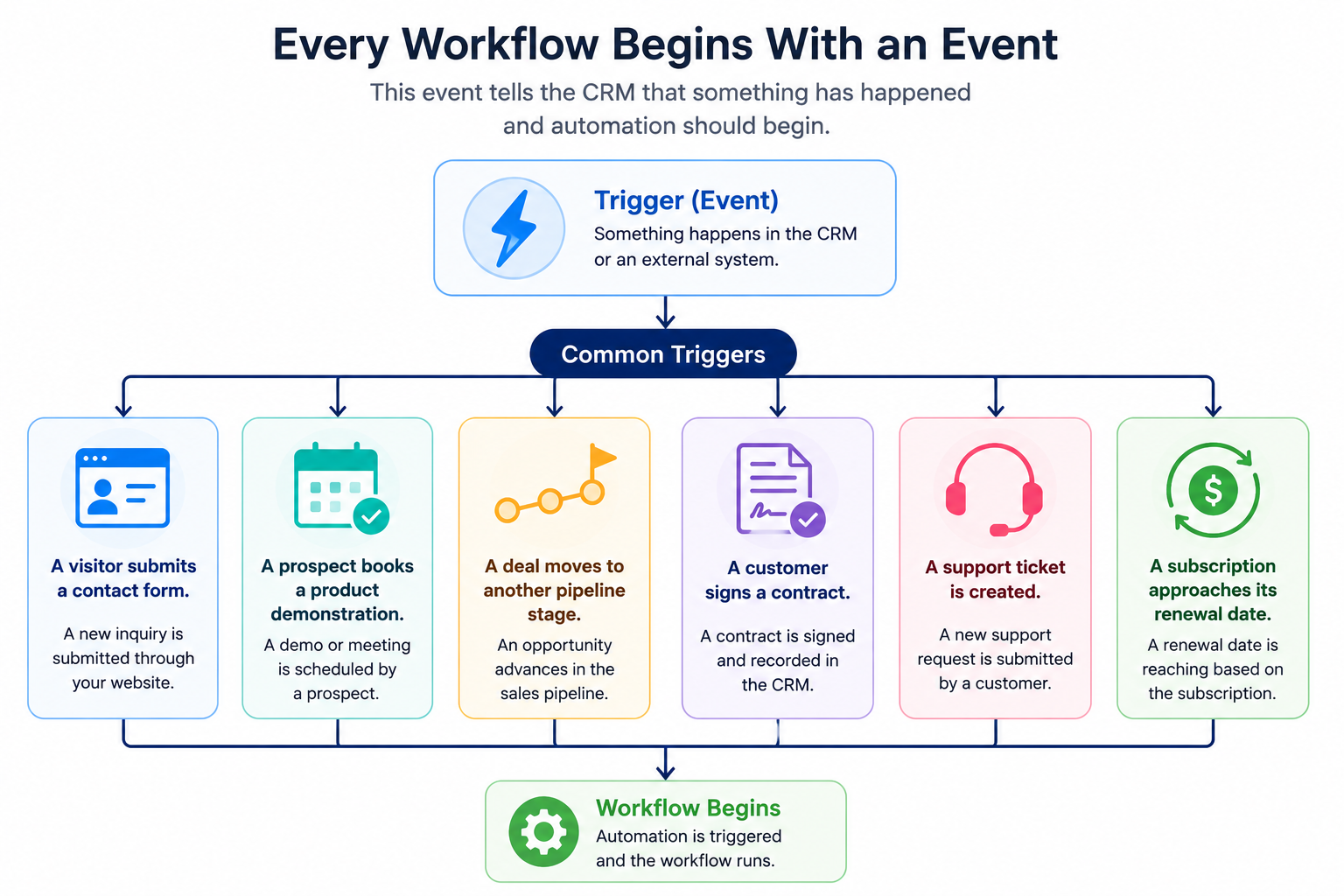
Imagine a software company receives a demo request through its website.
The submission becomes the trigger.
From that single action, the CRM immediately begins a predefined sequence of activities.
Instead of requiring multiple employees to complete each step manually, the workflow completes them within seconds.
Step 2: The Workflow Evaluates Conditions
Not every customer follows the same journey.
Businesses often create different workflows depending on company size, industry, location, product interest, estimated deal value, subscription level, or previous customer activity.
Conditions allow workflows to make these decisions automatically.
Suppose two companies request product demonstrations.
One employs fifteen people while the other employs five thousand.
Although both completed the same form, the enterprise opportunity may automatically route to a senior account executive, while the smaller business enters a standard sales process.
As organizations become more sophisticated, workflows can evaluate dozens of conditions simultaneously without requiring manual review.
Step 3: Automated Actions Complete the Process
After conditions are evaluated, the CRM performs one or more automated actions.
These actions may include assigning ownership to a salesperson, creating follow-up tasks, updating CRM records, notifying managers, scheduling reminders, enrolling contacts into marketing campaigns, creating support tickets, or moving opportunities into another sales stage.
Multiple actions often occur within seconds after a single customer interaction.
Rather than spending valuable time updating records after every meeting, employees remain focused on conversations, negotiations, and customer relationships.
CRM Workflow vs. CRM Automation
The terms CRM workflow and CRM automation are closely related, but they are not identical.
CRM automation is the broader capability that allows software to perform repetitive work without manual intervention. It includes email automation, lead scoring, reporting, forecasting, document generation, integrations, and AI-powered recommendations.
A CRM workflow is the sequence of rules that tells the CRM exactly when automation starts, what conditions must be met, and which actions should happen next.
For example, automatically sending a welcome email is an automation.
The process that creates a contact, checks qualification criteria, assigns the lead to the correct salesperson, schedules follow-up activities, updates reporting, and then sends the email is the workflow.
Understanding this distinction helps businesses build more effective CRM systems because the goal is not to automate everything. Instead, the objective is to automate repetitive work while allowing employees to focus on activities that require judgment, creativity, and relationship building.
Businesses looking to prioritize opportunities more effectively should also read Lead Scoring in CRM: How to Prioritize and Convert More Leads.
How AI Is Changing CRM Workflows
Traditional CRM workflows follow predefined business rules. Artificial intelligence expands these capabilities by helping businesses analyze customer behavior, recognize patterns, and recommend actions that would otherwise require manual analysis.
Many modern CRM platforms now use AI to summarize customer meetings, recommend the next best sales activity, predict which deals are most likely to close, identify stalled opportunities, draft personalized follow-up emails, and suggest workflow improvements based on historical performance.
Rather than replacing traditional workflows, AI makes them more intelligent. Businesses still define the overall process, but AI helps employees make faster and better decisions while reducing routine administrative work.
Common Types of CRM Workflows
Every business has recurring processes that consume time but follow predictable patterns. These processes are ideal candidates for workflow automation because they occur repeatedly and often require the same sequence of actions.
Although organizations create workflows tailored to their operations, most CRM workflows fall into several broad categories.
Lead Capture Workflows
Lead capture is usually the first automated process businesses build after implementing CRM software.
Instead of relying on someone to manually review website inquiries throughout the day, the CRM immediately responds whenever a prospect completes a form, requests a demonstration, downloads a resource, or starts a live chat.
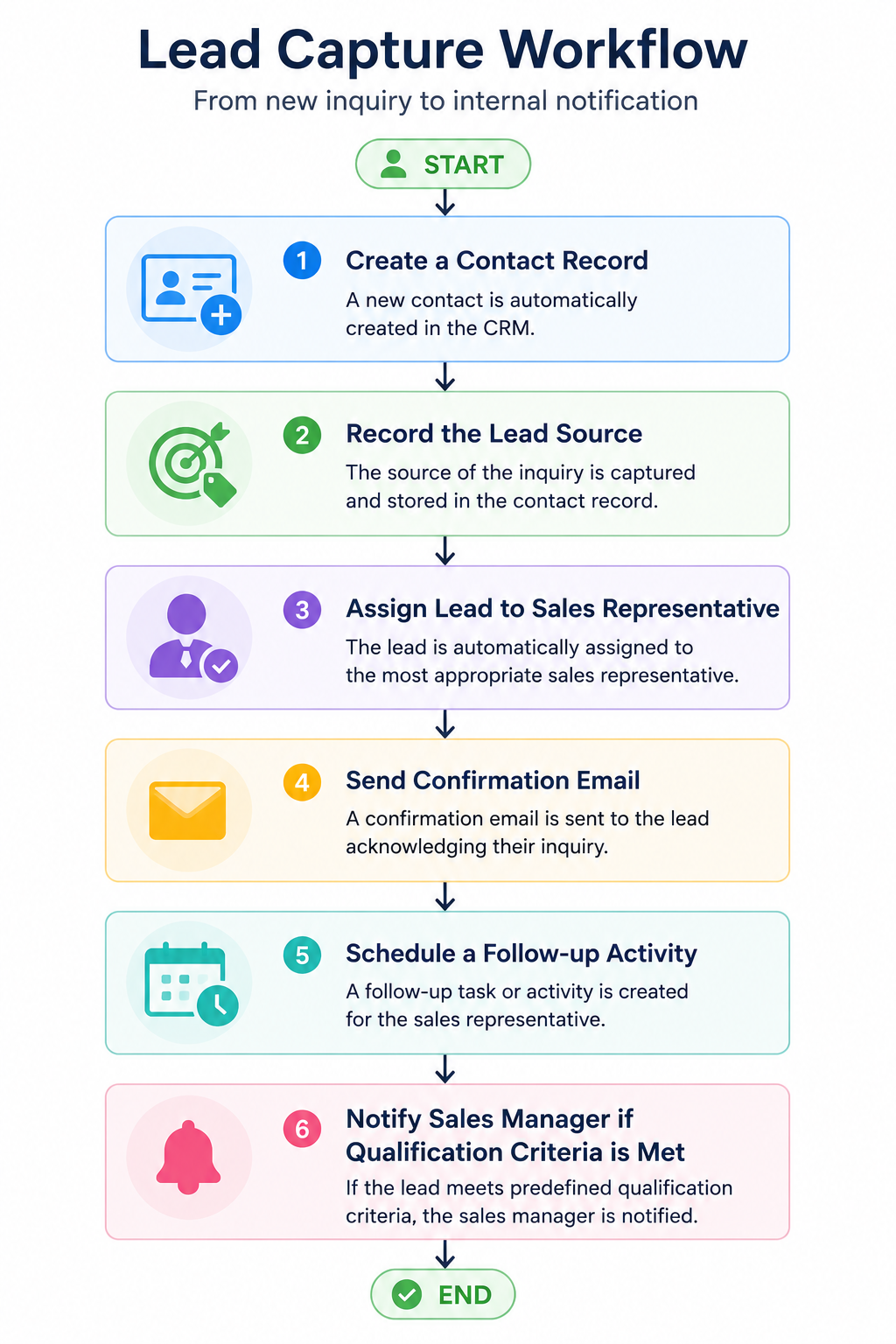
By responding immediately, businesses reduce the chances of leads becoming cold while ensuring every inquiry enters the sales process consistently.
Lead Qualification Workflows
Not every inquiry deserves the same amount of attention.
Some prospects are ready to purchase, while others are simply researching solutions. Qualification workflows help sales teams identify which opportunities deserve immediate attention.
Instead of assigning every lead manually, the CRM evaluates information such as:
• Company size
• Industry
• Geographic location
• Product interest
• Website activity
• Previous interactions
• Form responses
• Lead score
Based on these criteria, the workflow automatically routes prospects to the appropriate salesperson or sales queue.
Businesses interested in improving lead prioritization can also explore our guide on Lead Scoring in CRM: How to Prioritize and Convert More Leads.
Sales Pipeline Workflows
Sales teams perform dozens of repetitive activities while moving opportunities from initial contact to a closed deal.
Pipeline workflows reduce administrative work by automating routine tasks at every stage.
Here is an example of how a sales pipeline workflow looks like.
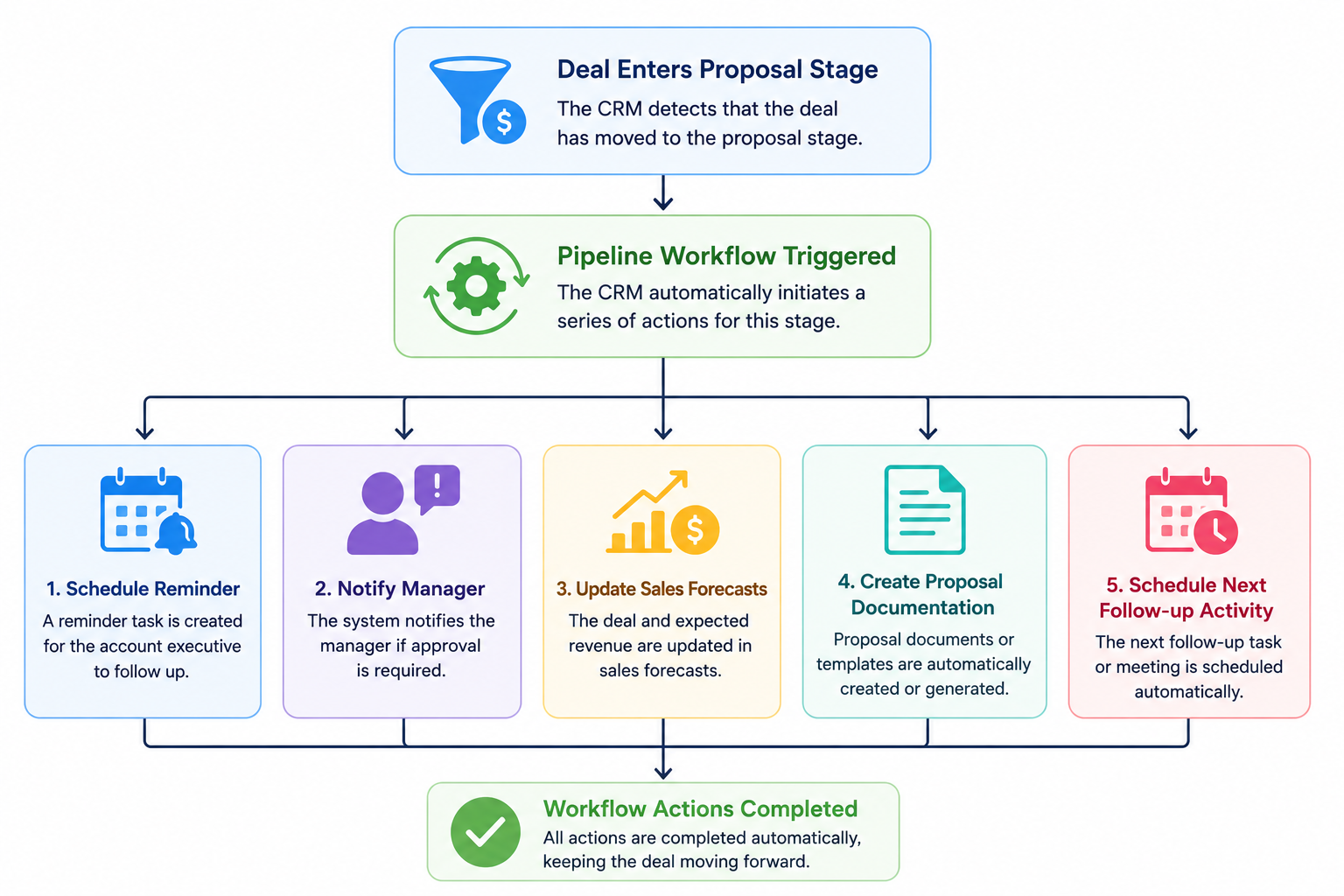
If no activity occurs within a predefined period, the workflow can remind the salesperson or escalate the opportunity to management.
Customer Onboarding Workflows
Closing a sale marks the beginning of a customer relationship rather than the end of the sales process.
Many businesses lose momentum after the contract is signed because onboarding activities depend on manual coordination between departments.
Customer onboarding workflows can reduce coordination delays when the trigger, ownership and required information are correct. Keep an exception path for missing data, unavailable owners and failed integrations.
Once a deal is marked as won, the CRM can automatically:
• Notify implementation teams.
• Assign onboarding specialists.
• Schedule kickoff meetings.
• Create internal project tasks.
• Send welcome emails.
• Monitor onboarding milestones.
Customers experience a smoother transition while employees spend less time coordinating administrative work.
Customer Support Workflows
Support teams often receive requests through multiple channels including email, chat, telephone, social media, and customer portals.
Support workflows organize incoming requests automatically.
Depending on the issue, the CRM can prioritize tickets, assign specialists, notify managers when service-level agreements approach deadlines, and trigger customer satisfaction surveys after cases are resolved.
As ticket volumes increase, these workflows help businesses maintain consistent response times without significantly increasing administrative effort.
Renewal and Customer Retention Workflows
For subscription businesses, recurring revenue depends on successful renewals.
Waiting until the renewal date to contact customers often reduces the likelihood of renewal.
Instead, CRM workflows begin weeks or months before contracts expire.
The workflow can automatically create renewal opportunities, schedule account review meetings, remind account managers to contact customers, generate renewal quotes, and notify leadership if no activity occurs before the renewal deadline.
Rather than reacting after customers leave, businesses proactively strengthen relationships throughout the renewal process.
CRM Workflow Templates
Businesses rarely need dozens of workflows immediately after implementing CRM software. Most begin with a handful of high-impact automations before expanding gradually.
Here are several workflow templates that almost every organization can benefit from.
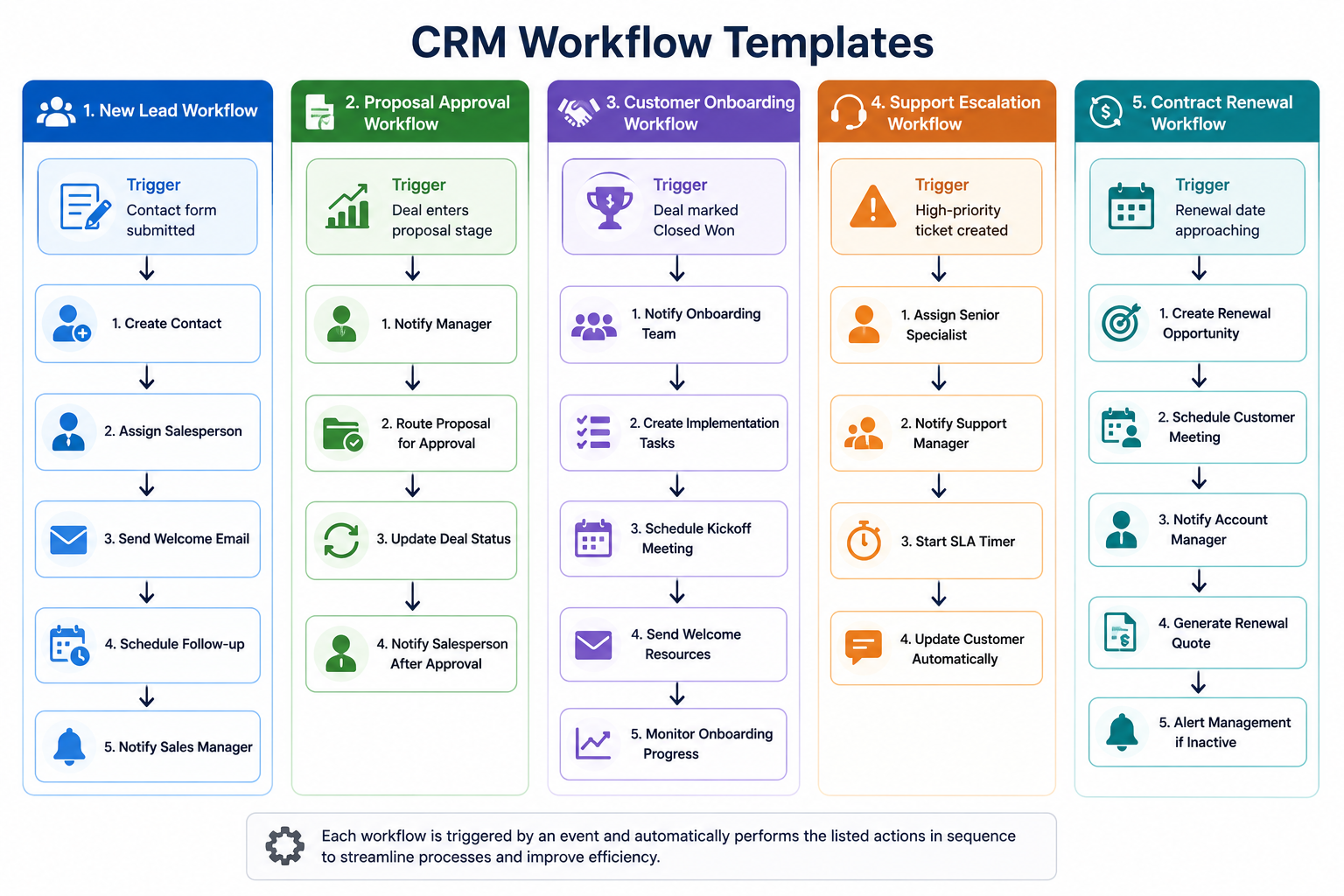
Worked example: route an inbound demo request without creating duplicate work. This fictional process is a design exercise, not a claim that every CRM includes these controls. Agree on the required plan and configuration before implementation.
The trigger is a completed demo-request form. The conditions check whether the request is a test record, whether an existing contact or opportunity already exists, and whether the record contains the fields needed for routing. Only a valid request enters the assignment step. An incomplete record goes to a named review queue instead of silently disappearing.
The action assigns one accountable owner and creates one follow-up task. If the owner is unavailable, use a documented backup queue. Define the response target around your staffed business hours; do not label a lead overdue before someone is expected to be working.
Test the same fictional request twice. Decide whether the second event should update the first record or be marked as a duplicate. The expected outcome is one current owner and no duplicate follow-up task. Keep an event identifier or another supported duplicate-control mechanism so a retry after an integration error does not produce two sets of work.
Before enabling outbound messages, test suppression, invalid addresses and consent or preference rules relevant to the channel. Keep a human review step for uncertain records. A workflow that can send a message is not evidence that sending that message is permitted.
For acceptance, record four cases: a new valid request, a duplicate, a request with missing routing data and a failure in the connected system. Each needs a visible outcome, a responsible person and a safe next action. Use only fictional data and disabled sending during the exercise.
After launch, review ownership gaps, overdue tasks and duplicate work alongside response time. A faster workflow is not necessarily a better workflow if it routes the wrong person, sends unwanted messages or hides failed steps. Maintain a simple stop procedure: pause the affected automation, preserve its execution history and put unresolved records into a controlled manual queue.
Frequently Asked Questions
What is a CRM workflow?
A CRM workflow is an automated sequence of actions triggered by specific events within CRM software. It helps businesses complete repetitive tasks consistently while reducing manual effort.
What is an example of a CRM workflow?
A common example begins when a prospect submits a website contact form. The CRM automatically creates a contact record, assigns the lead to a salesperson, schedules a follow-up task, and sends a confirmation email.
What is the difference between a CRM workflow and a sales pipeline?
A sales pipeline represents the stages an opportunity moves through during the buying journey. A CRM workflow automates the activities that happen before, during, or after those pipeline stages.
Do CRM workflows require coding?
Most modern CRM platforms provide visual workflow builders that allow business users to create workflows without programming knowledge. More advanced integrations may require technical expertise, but most day-to-day workflow automation is designed for non-developers.
How many workflows should a small business create?
Most small businesses benefit from starting with three to five essential workflows, such as lead capture, follow-up reminders, customer onboarding, support ticket routing, and renewal reminders. Additional workflows can be introduced as business processes become more mature.
Can artificial intelligence improve CRM workflows?
Yes. AI can recommend the next best action, summarize meetings, predict deal outcomes, identify stalled opportunities, draft follow-up emails, and suggest workflow improvements based on historical business data.
Final Thoughts
CRM workflows are the operational engine behind successful customer relationship management. Rather than simply storing customer information, they ensure that work moves through the business in a consistent, measurable, and scalable way.
Whether managing sales opportunities, onboarding new customers, routing support requests, or preparing contract renewals, workflows reduce manual effort while improving collaboration, response times, and customer experiences.
As CRM platforms continue integrating artificial intelligence into workflow automation, businesses will gain even greater opportunities to improve efficiency without increasing administrative workloads. Organizations that invest time in designing thoughtful workflows today will be better prepared to scale operations, support growing customer bases, and deliver consistently excellent experiences in the years ahead.